
Automation Planning
Automate what pays.Prove it first.
AutoStore, AMRs, pick towers — automation is the biggest cheque a warehouse writes. WareBee decides which items earn a slot in it, balances the work across it, and simulates the whole business case on your digital twin before you commit a penny.
Plan your automation
What actually belongs in AutoStore?
Fill a goods-to-person system with the wrong SKUs and it runs slower than the racking it replaced. WareBee scores every item on the factors that decide it — velocity, cube, order affinity, seasonality — and tells you, item by item, what earns a slot in AutoStore versus what stays in regular racking.
It's the same question for any goods-to-person or shuttle system: which stock pays for the automation, and which just fills it up.
- AutoStore / goods-to-person suitability, per SKU
- Velocity, cube, affinity and seasonality weighed together
- Keep the wrong items out before they slow the system down
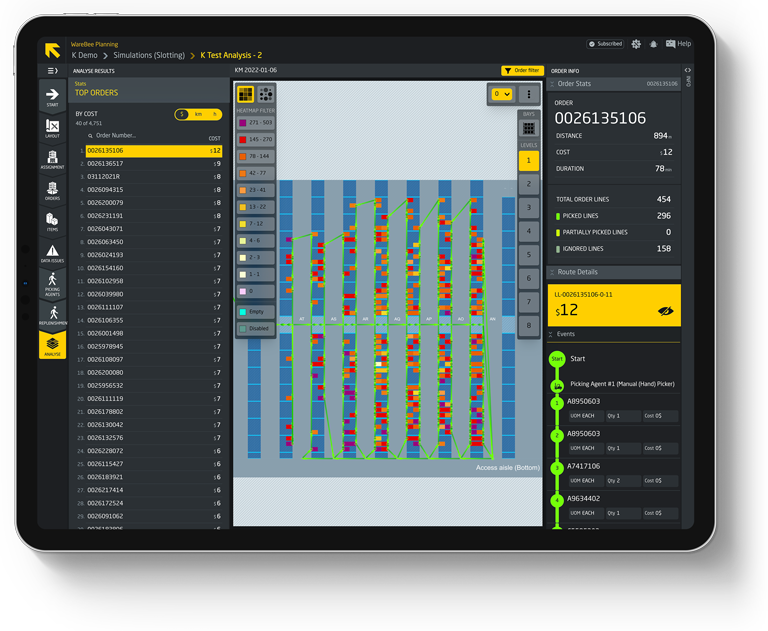
The automation decision
What WareBee weighs before you buy the robot.
Every factor scored on your own data, every scenario simulated in the twin — so the business case is evidence, not a vendor's brochure.
Item velocity
How often each SKU is picked — the first test of whether it earns an automated slot.
Pick frequency is pulled from your own order history across a full seasonal cycle, not a vendor's reference case. Below a certain frequency, a manual pick costs less than the automation slot it would occupy — so the model draws the line on your numbers, not an industry rule of thumb.
Cube & dimensions
What fits the bins and ports, and what wastes them — size decides suitability as much as speed.
Actual carton and tote dimensions are checked against the automation's bin and port envelope, item by item, not against an assumed average box. Odd shapes, oversized cartons and soft-pack items that jam a shuttle or a port get flagged before they're designed into a system that can't actually handle them.
Order affinity
Which items travel together, so automation isn't split across systems on the same order.
Co-occurrence is mined from real order lines, not a category guess, to see which SKUs habitually ship on the same order. Where those SKUs would land in different automated zones, the order needs a consolidation step downstream — a cost the business case has to carry, not one that surfaces after go-live.
Throughput & peak
Whether the system holds up at peak, not just on an average Tuesday.
Your highest-volume days — the surge weeks, not the calendar average — are replayed against the automation's rated throughput to see where a queue would actually build. A system that clears an average shift with room to spare can still buckle on the one week the business depends on getting right.
Labour impact
The hours automation actually saves — and where the remaining manual work lands.
The simulation reassigns tasks role by role rather than subtracting a headcount total: some positions shrink, others grow to cover exceptions, maintenance and the edge cases the machine hands back. What's left is a shift plan for the people who stay, not just a saved-hours figure on a slide.
Automation ROI
Cost, throughput and labour modelled together, so payback is proven before capital is committed.
Capex, ongoing maintenance and the labour delta all feed one model against the throughput gain the simulation actually produced — not three spreadsheets reconciled by hand. The payback timeline that comes out has already been tested against your volumes, so the number on the business case is the number the system delivers.
Balance the automation you already have
Automation you own still needs planning. WareBee load-balances the work across pick towers, shuttle ports and goods-to-person stations, so no station is a bottleneck while another sits idle — and the whole line runs at the throughput you paid for.
Test a reconfiguration, a new wave strategy or a peak-season plan in the digital twin first, and see the effect on every station before you change anything on the floor.
- Load-balance pick towers, ports and GTP stations
- Kill bottlenecks while other stations idle
- Simulate reconfigurations before peak, not during it
Learn more
What is warehouse automation planning?
Warehouse automation planning is deciding what to automate, which stock to put in it, and how to run it — before and after the capital is spent. It's the difference between an AutoStore or pick-tower that pays back on schedule and one that becomes an expensive bottleneck full of the wrong SKUs.
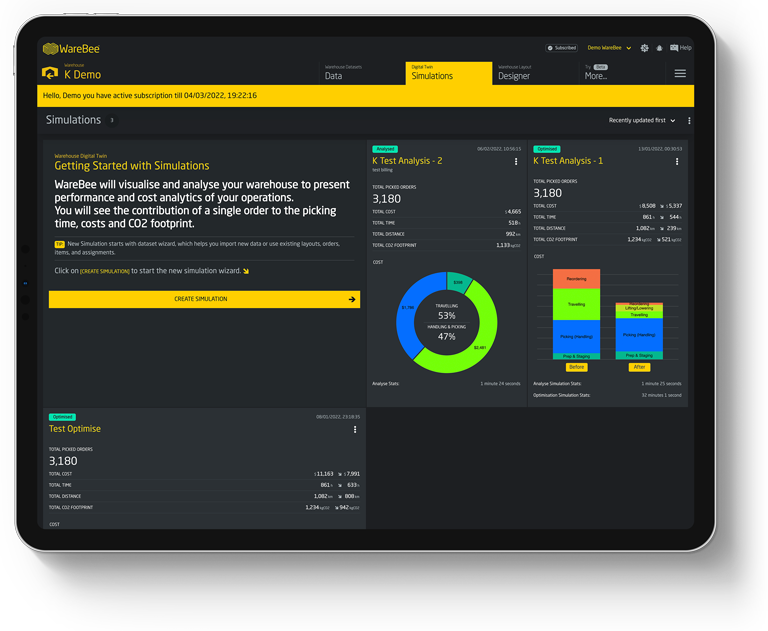
WareBee plans it on your digital twin. Because the twin already models your items, orders and space, it can score every SKU for goods-to-person suitability, simulate throughput and ROI for AutoStore, AMRs or shuttles, and load-balance the work across the stations you install — all on your real data.
That turns automation from a leap of faith into a modelled decision: which items go in, what the system will deliver at peak, what it saves in labour, and when it pays for itself — evidence you can take to the board before you sign the order.
Frequently asked questions
How WareBee plans, sizes and proves warehouse automation on your digital twin before you commit.
What is warehouse automation planning?
Automation planning is deciding what to automate, which stock to put in it, and how to run it — before and after the capital is spent. It is the difference between an AutoStore or pick-tower that pays back on schedule and one that becomes an expensive bottleneck full of the wrong SKUs.
How does WareBee decide which SKUs belong in AutoStore?
It scores every item on the factors that decide it — velocity, cube, order affinity and seasonality — and tells you item by item what earns a slot in AutoStore versus what stays in regular racking. The same logic applies to any goods-to-person or shuttle system: which stock pays for the automation, and which just fills it up.
What factors does WareBee weigh before I buy automation?
Item velocity, cube and dimensions, order affinity, throughput at peak, labour impact and automation ROI — each scored on your own data and simulated in the digital twin. Cost, throughput and labour are modelled together, so payback is proven before capital is committed.
Can WareBee help with automation I already own?
Yes. It load-balances the work across pick towers, shuttle ports and goods-to-person stations, so no station is a bottleneck while another sits idle. You can test a reconfiguration, a new wave strategy or a peak-season plan in the twin and see the effect on every station before changing anything on the floor.
Can I prove the business case before committing capital?
Yes — that is the point. WareBee simulates the whole business case on your digital twin before you commit a penny, modelling which items go in, what the system delivers at peak, and what it saves in labour. Automation becomes a modelled decision you can take to the board, not a leap of faith.
How does WareBee model all this on my warehouse?
Because the digital twin already models your items, orders and space, it can score every SKU, simulate throughput and ROI for AutoStore, AMRs or shuttles, and load-balance across the stations you install — all on your real data. Getting started takes less than a day, with a full optimisation run finishing in a few hours.